Choosing a new platform for an online store is rarely a “from scratch” decision. This usually happens after you’ve already lived with one ecosystem for a while, learned its strengths and blind spots, and reached a point where the way you sell, tell your brand story, and manage content no longer aligns perfectly with the tools you’re using.
At that stage, questions shift from “can this platform process orders?” to “does this platform help my brand look the way it should, support the kind of pages I actually use, and stay manageable without a pile of apps and custom code?” Squarespace often appears on the shortlist precisely in that moment: as a more design-centric, content-friendly environment that still lets you run a fully functional store.
In this overview we’ll look at Squarespace from a practical, migration-focused angle: where it works especially well for a store that’s already been through a first growth cycle, where the limits are compared to a more commerce-heavy setup like Shopify, and which technical nuances of moving platforms matter most if you want to preserve SEO, data, and structure. Many of the reasons why this “second stage” even happens – when a working Shopify store stops feeling like the right long-term home – are covered in our comprehensive Shopify review, where we break down its current strengths, hidden drawbacks, and the typical triggers that push merchants to consider Squarespace.
When Squarespace Actually Makes Sense After Shopify

Squarespace is not a “better Shopify” in everything. It’s different – and it shines in specific scenarios that are very common among ex-Shopify merchants.
For brands where design and content are central to the business, Squarespace often feels like a more natural home. If you sell a carefully curated range of products and care a lot about photography, storytelling and how your brand feels on every page, the platform’s templates and editor give you a more visual, editorial environment than a typical Shopify theme.
Squarespace is also a good fit when your catalog is moderate and stable. Many stores we move from Shopify to Squarespace manage dozens or low hundreds of SKUs. They don’t need complex enterprise inventory logic; what they really want is a store that’s easy to maintain, paired with strong pages for story, brand and content. For local boutiques, lifestyle brands, makers and small DTC projects, Squarespace usually covers the entire operational range without the overhead of a “big” eCommerce stack.
Another recurring pattern: businesses that combine services + products + content. You might sell physical or digital products, run workshops or consultations and maintain a blog or podcast. On Shopify, this often feels like bending a commerce-first platform into a hybrid shape. On Squarespace, this mix is almost the default: the site is built to combine a store with rich content and simple booking or inquiry flows.
Finally, many ex-Shopify owners simply want to escape the “app-store for everything” reality. On Shopify, even simple needs easily turn into a chain of third-party apps, each with its own pricing, settings and potential performance impact. Squarespace takes a different approach: a more integrated toolkit where common website and marketing functions are built in, and you only rely on a limited set of extensions. For some businesses, this reduction in moving parts is the biggest advantage of all. If this sounds like you, Squarespace is already worth a serious, non-theoretical look.
Key Squarespace Features That Matter to Ex-Shopify Merchants
You can find generic feature lists elsewhere. Here we’ll focus on what usually matters most when you come from Shopify with some battle scars.
Templates, sections and design control

The first difference most ex-Shopify owners feel is how much cleaner and more deliberate Squarespace designs are “out of the box”. Templates look like finished sites rather than skeletons that need heavy customization. The visual editor works with sections and blocks that adapt well to mobile and maintain consistent spacing and typography.
Instead of diving into theme code or hiring a developer for every visual tweak, you manage most of your brand’s look through simple controls for fonts, colors and layout. For someone used to Liquid, theme updates and fragile customizations, Squarespace feels much more like a design studio you can actually use yourself.
Store management and checkout basics

From a commerce point of view, Squarespace supports the essentials ex-Shopify owners rely on: physical and digital products, basic inventory control, product variants and options, discount codes, gift cards, taxes and mainstream payment gateways like Stripe and PayPal. For small and mid-sized catalogs, this is more than enough to cover the everyday operations you’re used to.
The difference is less about “can I do X” and more about how deep and flexible each feature gets in edge cases. If your catalog is manageable and your processes are not extreme, you’ll probably find Squarespace’s commerce layer adequate, and appreciate how tightly it is integrated with content and design.
Content management, blogging and pages
This is where many ex-Shopify owners say: “I wish I had done this earlier.” Blogs, long-form pages, resource hubs and portfolios simply look and feel better on Squarespace. The editor encourages rich content: image galleries, embeds, quotes, sections with different visual rhythms. You are not fighting a store-first template to create editorial-style layouts.
If content marketing or brand storytelling is important for your acquisition, Squarespace turns your site into a real content platform, not just a product grid with a blog attached somewhere.
Marketing, SEO and basic automations
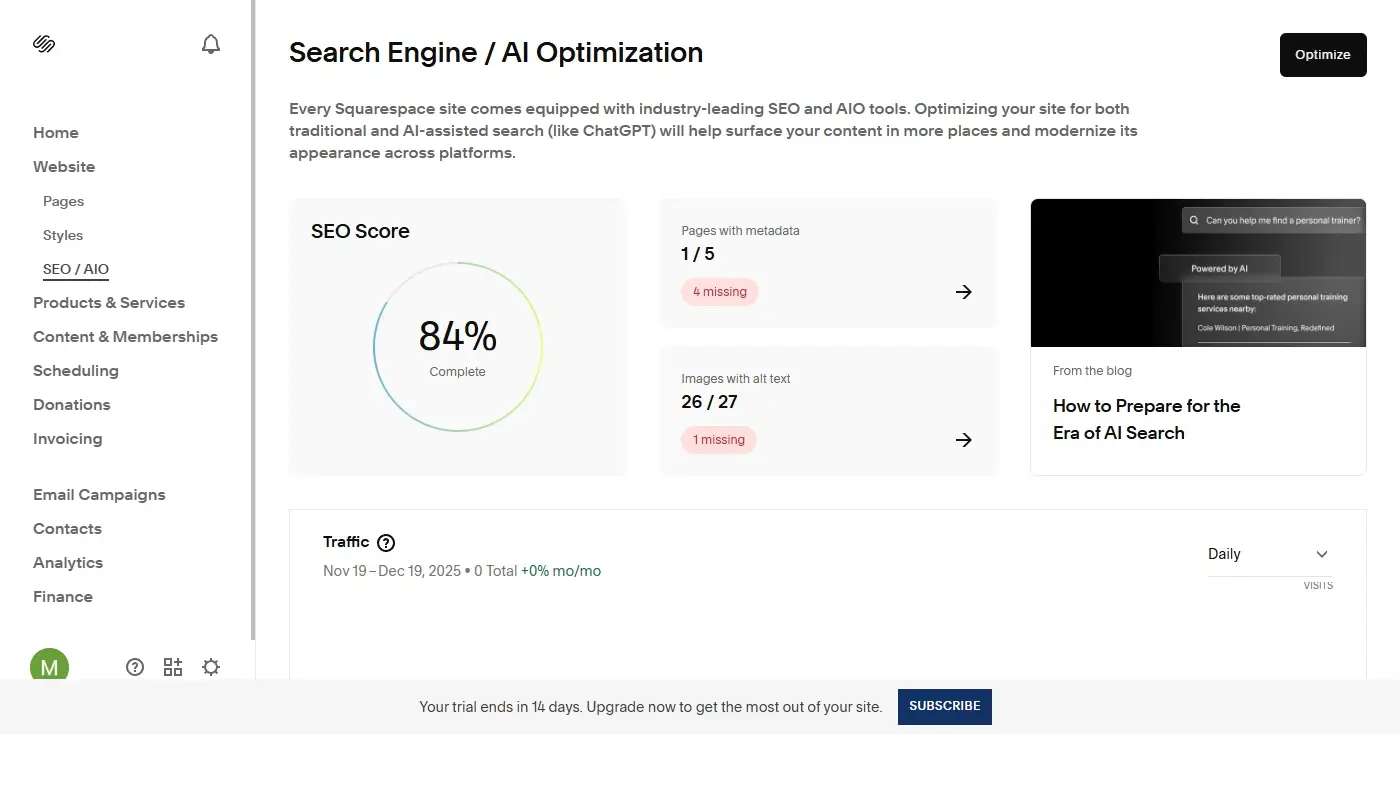
Squarespace includes built-in tools for titles, meta descriptions, clean URLs, basic redirects and social sharing. On specific plans you also get Squarespace Email Campaigns, which allows you to run newsletters and simple automated sequences right within the same ecosystem.
For many ex-Shopify merchants who are not relying on a heavy app-based growth stack, this unified, integrated approach is enough.
What You Lose When Leaving Shopify (Honest Limitations)
To stay fair, we have to talk about the things Squarespace does not replace one to one.
For large and complex catalogs with thousands of SKUs, multiple warehouses, intricate B2B logic or highly segmented pricing, Shopify remains better suited. Its product, collection and inventory systems are built to handle high-scale commerce, and trying to squeeze that level of complexity into Squarespace usually leads to compromises you will not enjoy.
The same is true for deep app ecosystem usage. Shopify’s App Store is enormous. If your current setup depends on very specific upsell funnels, enterprise-grade reporting, niche shipping integrations or advanced loyalty and referral systems, there may simply not be a direct equivalent in Squarespace’s smaller, more curated extension marketplace. Sometimes these flows can be simplified or rebuilt with external tools; sometimes the migration becomes a strategic question of what you are ready to give up for the sake of simplicity.
Another point is advanced multi-currency and multi-store configurations. Squarespace supports selling in different currencies and locales, but if you currently maintain multiple Shopify stores for various regions, with different catalogs and highly granular tax/shipping logic per market, moving to Squarespace means consciously simplifying your architecture. In some cases that is a welcome change that reduces overhead. In others, the business model truly calls for staying in the Shopify ecosystem or considering an alternative better tailored to complex international setups. A more structured, point-by-point look at how Squarespace and Shopify compare on catalog size, app ecosystem and international setups is covered in our real-world Squarespace vs Shopify comparison for store owners who are already thinking about moving.
Migration Nuances: What Ex-Shopify Owners Should Watch
The platform choice is only half the story. The other half is the migration itself – and this is where our specialization matters the most.
URLs, redirects and SEO
Shopify and Squarespace structure URLs differently. Collections, products and blogs rarely match one to one. If you simply turn off the old store and publish the new one without planning, you risk breaking long-standing URLs, losing search visibility and confusing regular customers.
A careful migration involves mapping key Shopify URLs to their Squarespace equivalents, setting up 301 redirects, preserving or improving meta titles and descriptions and checking internal links inside your content so they don’t accidentally point to non-existent pages. For stores that rely on organic traffic, this is the most sensitive part of the move and requires more than just CSV exports.
Products, variants and options
Although Shopify and Squarespace both support product options and variants, their internal models differ. During migration we almost always have to rethink how options are grouped and presented, which variants actually need to exist and how inventory, SKUs and prices transfer to the new system.
On our projects we usually run a test import on a staging Squarespace site, check how products look from a customer’s perspective and adjust the structure before the final move. This avoids unpleasant surprises, such as variant combinations being presented awkwardly or inventory counts being misaligned.
Content layouts and design translation
When moving from Shopify, you usually face a strategic choice: replicate your current design closely, or treat the migration as a chance for a controlled redesign.
In both cases, we start by choosing a Squarespace template that is structurally close to your current or desired layout. Then we carefully rebuild key pages: homepage, collection or category overviews, product pages, about, contact, content hubs. Sections and blocks replace Shopify’s sections and content areas; spacing, typography and imagery are adjusted so the result feels familiar but often cleaner and more consistent, especially on mobile.
The goal is simple: your brand identity stays recognizable, but your team gains a more stable and understandable editing workflow.
Apps, forms and edge functionality
Any functionality currently provided by Shopify apps needs to be reviewed early. This includes contact and lead forms, pop-ups, subscription widgets, loyalty programs, upsell logic or small custom scripts sprinkled across the site.
In practice, some of these flows can be recreated with native Squarespace tools and a few carefully chosen extensions. Others are better simplified: for example, replacing several overlapping popup apps with a single well-designed signup section in the layout.
Typical Migration Scenarios We See
From project to project the details change, but the core patterns repeat. Three scenarios appear most frequently: the small lifestyle brand tired of tech overhead, the service-plus-products hybrid business and the creator selling digital products alongside a growing content library.
In the first case, the store usually has a focused catalog, simple shipping rules and one or two main sales channels. Shopify is technically fine, but the owner feels trapped by the app stack, frustrated by design tweaks and disappointed with how the blog looks. Moving to Squarespace often feels like finally aligning the platform with the brand: the site becomes more editorial, simpler to manage and less dependent on third parties.
In the second scenario, the business offers workshops, events or consulting and also sells merch or digital downloads. On Shopify, the store part works, but the service and storytelling aspect always feels secondary. Squarespace lets this type of business push services, team and story to the forefront, while the store remains fully functional yet less dominant in the structure.
The third scenario is about creators who sell e-books, presets, courses or templates and maintain an active blog, portfolio or resource section. On Shopify, they constantly fight the theme to build content hubs and landing pages. On Squarespace, they finally get a tool that was designed from the start for content-rich sites, with commerce as a natural extension rather than the only center of gravity.
If any of these stories sound familiar, Squarespace may be less a “new platform” and more a better match for how you already work.
Is Squarespace Your Next Step After Shopify?
Squarespace is not “Shopify, but prettier”. It is a platform with a different philosophy: design-centric, content-first and focused on an integrated, manageable toolkit rather than an endless app ecosystem.
For ex-Shopify store owners who don’t operate massive catalogs, want to lean into storytelling and content, and are tired of coordinating apps, developers and theme updates, Squarespace often becomes a more comfortable long-term home. And if you’re still weighing whether Squarespace is the right direction or you should aim for something more “enterprise” or more “DIY”, a broader overview of the best Shopify alternatives will help you see where Squarespace sits alongside other options and why it so often ends up being the first candidate to test in practice.
If you see yourself in this description and want to move without losing SEO, traffic or structure, this is exactly what we do at Shopify-to-Squarespace.com. We handle the technical migration, URL mapping, design translation and testing, so you can focus on what you actually sell.